CAD WORKFLOWS
CATIA agents: delivered workflows and a useful pilot
Principle & workflow
From engineering intent to editable CAD
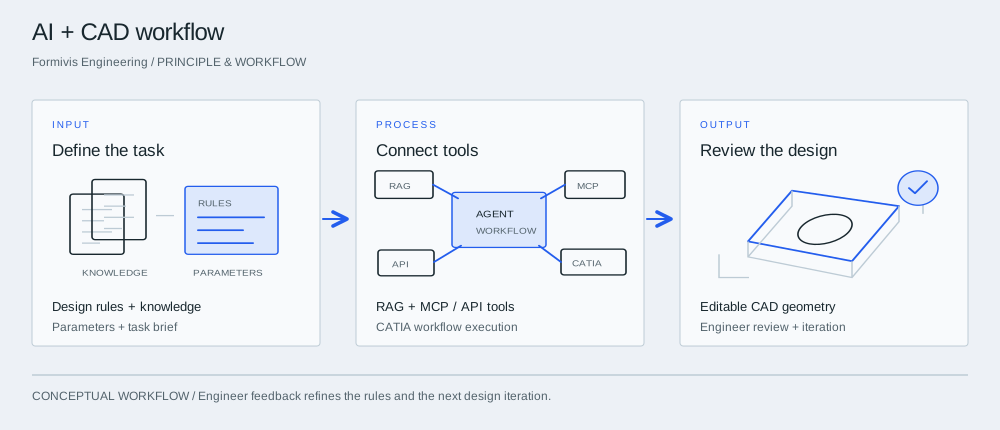

InputDefine the task
Start with a fixture or repeatable part family. Supply the design rules, parameter ranges and reference knowledge that define acceptable output.
ProcessConnect tools
The agent retrieves relevant knowledge and uses authorized tools to carry out defined engineering steps. The integration connects the model with the actual CAD or business system.
OutputReview the design
Review native geometry, parameter values and rule compliance. Feed corrections back into the workflow before extending it to more designs.
What the supplied profile describes
The technical profile describes delivered AI agent applications in CATIA design automation, fixture design and aerospace structures. Agents connect parametric modeling with RAG knowledge, Function Calling / MCP and single- or multi-agent workflows. Private/local, API and edge deployment are delivery options.
A five-stage engineering engagement
The stated process moves through requirements and process decomposition, knowledge/tool connection, orchestration, integration/deployment, and evaluation/operation. LoRA tuning of Qwen / Llama and dedicated enterprise-model training remain on the development roadmap.
Start with a decision, not a demo
A useful pilot asks whether one defined workflow is worth integrating. Describe the inputs, variations, expected output and conditions in which the task must stop for human review. This creates a testable question rather than an open-ended promise.
Use the current process as a real alternative
Existing CAD tools already support mechanisms such as parameterization, rules and reusable knowledge. The relevant alternative may be a maintained template or script. Compare the proposed workflow with that baseline, including setup and maintenance effort.
Measure the complete task
Record preparation, automated execution, review, correction and final handoff. A fast generation step is not enough if the output needs extensive rework. Check native editability and whether the result meets the same engineering rules.
Agree what success would change
Define the acceptance conditions before evaluation. If the pilot passes, the next decision might be a second part family or a restricted integration. If it fails, record the limiting inputs and avoid extending the conclusion beyond the tested workflow.
Take into the discussion
- One bounded task family
- Representative input variations
- An editable baseline and clear rules
- Total review and correction effort
- Agreed acceptance criteria
Technical questions
What has already been implemented?
The supplied profile describes agent applications for CATIA design automation, fixture design and aerospace structures. It also lists RAG, Function Calling / MCP, multi-agent workflows and private deployment capabilities.
Can the system run within our enterprise?
Private and local deployment are offered. The agreed architecture must identify model hosting, knowledge storage, tool connections and any external dependencies to meet your data boundary.
Is domain-model training already released?
The profile identifies Qwen / Llama LoRA domain tuning and enterprise-model training as work in progress. They require a separate development scope.