Engineering-tool integration
Parametric modeling and design-process automation.
DESIGN INTELLIGENCE Delivered agent applications · Custom integration
Custom AI agents connect CATIA parametric design, RAG knowledge bases and MCP/API tools to real engineering workflows, with private or edge deployment and ongoing support.
Scope a CAD workflow pilot ↗Technical highlights
Reported capabilities and figures from the supplied technical profile, with their application context.
Parametric modeling and design-process automation.
Retrieval, Function Calling and single- or multi-agent orchestration.
Local enterprise deployment and edge integration, scoped to the data boundary.
Process review → knowledge/tools → orchestration → integration → evaluation and operation.
Source: Technical Capabilities — External Presentation · 2026-08 · pp. 3. Source and scope ↓
Engineering overview
From process decomposition to deployment, Formivis connects an agent to the knowledge, tools and business systems needed to complete a defined task. The supplied profile describes delivered applications in CAD design automation, fixture design and aerospace structures, combining software agents with equipment-development capabilities.
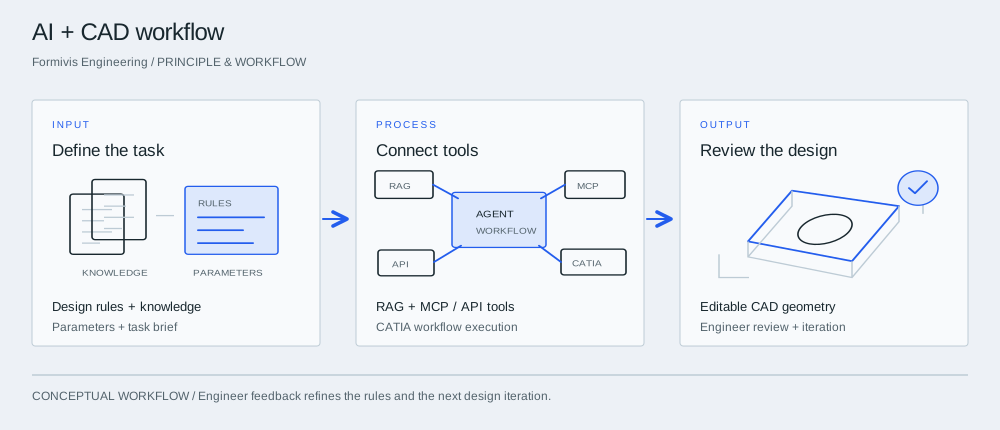
Principle & workflow

Start with a fixture or repeatable part family. Supply the design rules, parameter ranges and reference knowledge that define acceptable output.
The agent retrieves relevant knowledge and uses authorized tools to carry out defined engineering steps. The integration connects the model with the actual CAD or business system.
Review native geometry, parameter values and rule compliance. Feed corrections back into the workflow before extending it to more designs.
Delivered application area
Drive parametric modeling and repeatable design steps in CATIA. Connect fixture-design rules with the team’s structural design and topology-optimization capabilities.
Technical capability
Combine enterprise knowledge retrieval, Function Calling / MCP tools and workflow orchestration to plan tasks and operate authorized business systems.
Technical capability
Process documents, generate reports, answer enterprise knowledge questions and analyze inspection or test data. Deliver useful outputs inside the current business process.
| Stage | Engineering work |
|---|---|
| Requirements | Map the business process and define automation boundaries. |
| Knowledge & tools | Connect RAG knowledge bases and MCP / API tools. |
| Agent workflow | Build single-agent or multi-agent orchestration. |
| Integration & deployment | Connect business systems; configure private, local or edge deployment. |
| Evaluation & support | Evaluate output quality; iterate and maintain the application. |
Applications & value
Profile-reported application
Automate repetitive parameter changes and defined design steps while engineers own the rules and release review.
Application context
Turn reusable technical knowledge and inspection/test outputs into searchable answers and repeatable reports.
Who it's for
Engineering teams automating fixture design and repeatable CATIA tasks, and enterprises connecting technical knowledge with document, report and inspection-data workflows.
Bring the application, representative inputs and acceptance criteria. We will connect the relevant technology and platform to a defined engineering deliverable.
Before we begin
The supplied profile describes agent applications for CATIA design automation, fixture design and aerospace structures. It also lists RAG, Function Calling / MCP, multi-agent workflows and private deployment capabilities.
Private and local deployment are offered. The agreed architecture must identify model hosting, knowledge storage, tool connections and any external dependencies to meet your data boundary.
The profile identifies Qwen / Llama LoRA domain tuning and enterprise-model training as work in progress. They require a separate development scope.
The next step