CAD AUTOMATION · TOOLING
How to Evaluate CATIA Automation for Fixture and Tooling Variants
Principle & workflow
From engineering intent to editable CAD
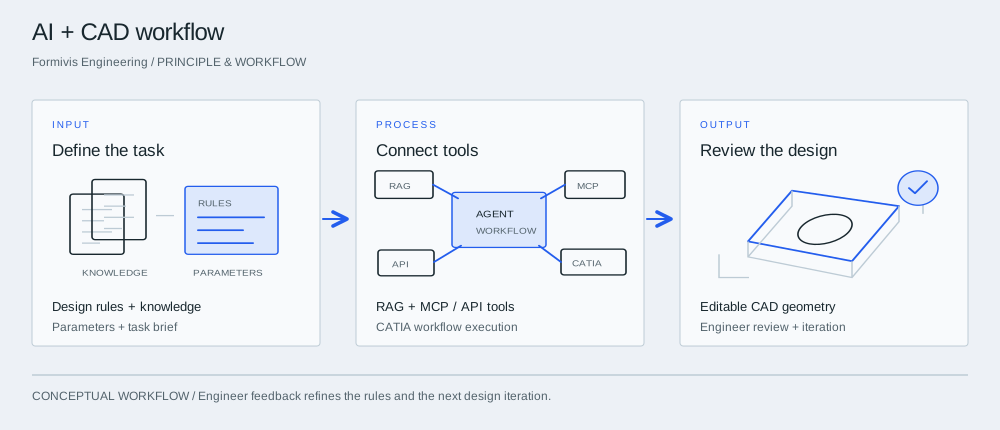

InputDefine the task
Start with a fixture or repeatable part family. Supply the design rules, parameter ranges and reference knowledge that define acceptable output.
ProcessConnect tools
The agent retrieves relevant knowledge and uses authorized tools to carry out defined engineering steps. The integration connects the model with the actual CAD or business system.
OutputReview the design
Review native geometry, parameter values and rule compliance. Feed corrections back into the workflow before extending it to more designs.
Why fixture families are useful pilot candidates
Jigs, fixtures, brackets and other tooling often repeat a stable design pattern while dimensions, interfaces and surrounding product geometry change. That makes them useful pilot candidates for CAD automation, but only when the repeated structure is genuinely understood. Begin by identifying what is allowed to vary, what must remain fixed, which design rules come from company practice, and which decisions still require an engineer. The goal is not to automate every modeling action. It is to establish whether one bounded family of engineering work can be made more repeatable without losing editability, traceability or design intent.
Separate parameters from engineering rules
A robust pilot distinguishes simple input parameters from rules that encode engineering knowledge. A hole diameter may be a parameter; minimum edge distance, material-dependent thickness, naming conventions and interface clearances are rules. Dassault Systèmes describes CATIA Knowledgeware and automated engineering around reusable templates, formulas, rules, checks and company know-how. A buyer should therefore document which knowledge is already explicit and which still exists only in engineers’ judgment. Automation is easier to maintain when these two categories are visible rather than hidden inside scripts or prompts.
Benchmark the final CAD artifact, not the conversation
The output should be tested as an engineering artifact. Does the native model open correctly? Are expected features, parameters and references present? Can another engineer make a normal design change without rebuilding the part? Does the feature tree remain understandable? Does the model pass the same internal checks as the current workflow? A conversational agent saying that a fixture was updated is not evidence that the CAD model is acceptable. Use deterministic checks where possible and reserve human review for requirements that cannot be reduced to a simple rule.
Include exceptions and recovery in the acceptance test
Real production work contains missing references, out-of-range inputs, changed interfaces and geometry that violates the assumptions of a template. The pilot should deliberately include several of these cases. Record whether the automation stops safely, asks for clarification, produces an invalid model or can recover after correction. Also record the time an engineer spends reviewing and repairing the result. A workflow that completes the common case quickly but fails opaquely on exceptions may create more maintenance burden than a simpler template or script.
Scale only after the first family is maintainable
If a pilot succeeds, the next step should be another controlled family or a wider range of input variation—not an immediate claim that all CAD work can be automated. Keep versioned rules, test examples and a held-out regression set so that changes to prompts, tools, integrations or models can be checked against known tasks. Formivis describes CATIA-linked automation, RAG knowledge and Function Calling/MCP integration in its supplied technical profile; any production benefit still needs to be demonstrated on the buyer’s own workflow and acceptance criteria.
Build a fixture-family acceptance matrix
For each agreed fixture variant, record the part revision, locating datum scheme, clamping interfaces, parameter limits and required tool access. Use normal variants, boundary values and deliberately incompatible inputs. Check locating and clamping geometry against the actual part, then inspect collisions and access through the intended assembly sequence. A model that regenerates without an error can still locate a part incorrectly or obstruct a tool. The reviewer should record these checks separately from whether CATIA successfully completed the command sequence.
Separate rule failures from template maintenance
Classify every failed variant as an invalid input, a broken reference, a missing engineering rule or a template limitation. Record the correction and rerun the affected examples after changing the template. Keep at least one approved variant outside the examples used to develop the automation. This makes the acceptance record useful when the next part revision arrives and helps distinguish a reusable family workflow from a demonstration that only works on its original inputs.
Take into the discussion
- One representative fixture or tooling family
- Explicit parameters and engineering rules
- Native CAD acceptance checks
- Exception and recovery cases
- Held-out regression tasks